

This article is designed for YouTube content creators who want to maintain a positive and engaged community on their channels. It’s especially relevant for those who are dealing with negative or harmful comments and are seeking practical ways to moderate and manage their comments section effectively. Introduction: Managing Comments for a Positive Channel As a
This article is designed for YouTube content creators who want to maintain a positive and engaged community on their channels. It’s especially relevant for those who are dealing with negative or harmful comments and are seeking practical ways to moderate and manage their comments section effectively.
Introduction: Managing Comments for a Positive Channel
As a YouTube content creator, the comments section under your videos serves as a hub for interaction, feedback, and community building. However, not all comments contribute positively. Some can be harmful and detrimental to both your channel’s image and the sense of community you’ve nurtured. In this guide, we’ll explore effective ways to moderate comments on your YouTube videos, ensuring a thriving and welcoming environment for both creators and viewers.
Enabling Comment Moderation via YouTube Studio
YouTube Studio offers a dedicated section for managing your comments, allowing you to take control of the discussions on your channel. To begin, it’s essential to activate comment moderation. This feature empowers you to review comments before they’re publicly visible, giving you the opportunity to filter out potentially harmful or inappropriate content.
To enable comment moderation:
- Open YouTube Studio through a web browser.
- Click on “Settings” at the bottom of the left sidebar.
- Navigate to “Community” in the menu.
- Select “Defaults” at the top of the settings menu.
- Click “Hold potentially inappropriate comments for review.”
- For higher protection, consider checking the “Increase Strictness” option.
- Alternatively, choose “Hold all comments for review” if you prefer reviewing all comments before they go public.
- Save your settings to activate comment moderation.

Image by:https://blog.hootsuite.com/

Note that comments held for review are accessible for 60 days, allowing you ample time to review and approve them. After this period, the comments held under review will no longer be visible.
Adding Moderators to Your YouTube Channel
Enhance community engagement by appointing moderators to assist in managing comments. This delegation allows you to focus on content creation while trusted individuals oversee the discussions. You can opt for paid or voluntary moderators, depending on your arrangement and community dynamics.
To add a comment moderator:
- Go to “Settings” on the left sidebar of YouTube Studio.
- Click “Community.”
- Under “Automated filters,” type the name or URL of the YouTube account you want to add in the “Managing moderators” field, separating each with a comma.
- You can also use the “Standard moderators” field, which grants fewer permissions.
- Save your changes to add the moderator.

Image by:https://www.quora.com/

Moderators can’t access your YouTube Studio dashboard but can review and manage comments from your YouTube channel page.
Blocking Certain Words in YouTube Comments
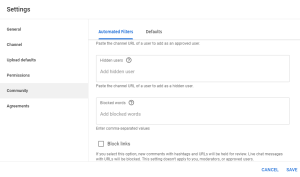
YouTube offers a “Blocked words” feature to prevent specific words from appearing in comments and chats. Comments containing these blocked words will be automatically held for review, ensuring that potentially inappropriate content is not immediately visible to the public.
To block certain words:
- Access “Settings” on the left sidebar of YouTube Studio and click “Community.”
- Scroll down to the “Blocked words” field.
- Type each word you want to block, separated by commas.
- You can also activate the “Block links” checkmark to prevent potential spam or redirects.
- Save your changes to implement the blocked words feature.

Image by:https://statusbrew.com/
Critical Review of YouTube Comments: Protecting Your Channel
Harmful comments have the potential to tarnish your channel’s reputation, even if you remove them later. Therefore, it’s crucial to review comments critically before they become visible to the public. The task can be particularly daunting for popular channels with diverse interactions. Regardless of the nature of the comments—constructive, spammy, or abusive—it’s wise to embrace a pre-publication review approach. This practice safeguards your channel’s integrity and fosters a respectful and engaging community.




















Leave a Comment
Your email address will not be published. Required fields are marked with *