
In the modern era, camera technology has advanced at a staggering pace. We can now capture high-resolution images in a fraction of a second, resulting in thousands of photos stored on our smartphones and cloud drives. However, this abundance has created a “digital junk drawer” effect. Heartwarming tales and once-in-a-lifetime moments are often buried under
In the modern era, camera technology has advanced at a staggering pace. We can now capture high-resolution images in a fraction of a second, resulting in thousands of photos stored on our smartphones and cloud drives. However, this abundance has created a “digital junk drawer” effect. Heartwarming tales and once-in-a-lifetime moments are often buried under a mountain of screenshots and blurry outtakes.
Choosing the right photo album design software is the bridge between a cluttered hard drive and a curated legacy. Whether you want to print a physical heirloom for your coffee table or create an interactive digital magazine to share on social media, the following tools offer the best features to organize, edit, and celebrate your life’s work.
1. PrintXpand Photo Design Software
The Professional Choice for E-commerce and Customization
PrintXpand stands out as a premier choice for those who view photo albums as both a personal treasure and a potential business venture. This software is specifically engineered for e-commerce integration, allowing users to offer customization services to their own clients. However, even for individual users, its interface is remarkably intuitive.
The platform provides a vast library of default templates, themes, and clipart. This allows you to move from a blank screen to a polished, modern design in just a few clicks. One of its most impressive functional features is its device-agnostic nature. You can begin designing an album on your desktop at home and make final tweaks on your tablet while commuting.
Furthermore, PrintXpand prioritizes quality control. The software includes an advanced “low-quality” warning system that alerts you if an image won’t print clearly at its chosen size. For those moving toward physical production, it generates print-ready PDFs supporting CMYK color modes, ensuring that the vibrant colors you see on your screen translate perfectly to the printed page.
2. Adobe Bridge
The Ultimate Creative Asset Manager
If you find yourself overwhelmed by the sheer volume of your photo collection, Adobe Bridge is your best ally. Unlike software that focuses solely on the “book” aspect, Bridge is a high-level organizational tool. Best of all, it is available to download without a paid Creative Cloud subscription, making it a powerful free resource.
Adobe Bridge acts as a central hub for all your creative files. It excels at batch-processing, which is a lifesaver when you have five hundred photos from a single wedding or vacation. You can define color preferences, add watermarks, and edit metadata for hundreds of images simultaneously. The drag-and-drop functionality makes it incredibly simple to sort your “best-of” shots into dedicated folders for album creation. If you are a professional photographer or a serious hobbyist, this software provides the professional-grade control you need to keep your library pristine.
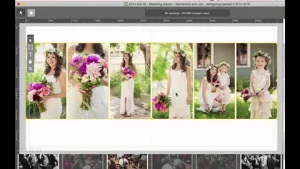
3. Inpixio Photo Studio Pro 12
The Specialist in Photo Restoration and Editing
Before a photo goes into an album, it often needs a little bit of “love.” Inpixio Photo Studio Pro 12 is built for the perfectionist who wants to restore old memories or enhance new ones. It focuses heavily on retaining image quality while performing complex edits.
The “Erase” tool is particularly noteworthy. It allows you to remove unwanted background distractions or even repair physical damage on scanned vintage photos, such as scratches and stains. Additionally, the “Clone” feature helps you sharpen details by redrawing elements for better clarity. For those who enjoy a bit of whimsy, Inpixio makes it incredibly easy to create photomontages. In just three steps, you can lift your subjects out of a mundane background and place them in a beautiful vacation landscape, adding a unique, creative flair to your family albums.
4. MAGIX Photostory Deluxe
Creating Cinematic Digital Memories
Not every album needs to be printed to be impactful. MAGIX Photostory Deluxe is a specialized tool for creating digital stories that feel cinematic. It is highly compatible with a wide range of formats, including RAW files, which is essential for high-end photography enthusiasts.
This software focuses heavily on the visual dynamics of your images. It offers sophisticated color correction and light adjustment tools to ensure every shot looks its best. Beyond the basics, it includes HDR effects and a specialized tool for removing the dreaded “red-eye” effect. If you want to turn your holiday photos into a high-definition slideshow with smooth transitions, cropping, and scaling, MAGIX provides a streamlined, professional experience that is hard to beat.
5. Flip Builder
Interactive Digital Magazines and Brochures
Flip Builder is a unique entry in the world of photo software. It is the ideal choice for professional designers, advertisers, or business owners who want to present their photos in a “flipbook” format. Instead of a static PDF, Flip Builder creates an interactive e-catalog or digital magazine.
The magic of Flip Builder lies in its ability to incorporate multimedia. You can embed videos and animations directly onto the pages of your photo album. Imagine a wedding album where, next to a photo of the first dance, you can click a “play” button to watch the actual video footage. This level of interactivity makes your memories feel alive. Once your creation is finished, you can easily share it via social media or email, making it a fantastic tool for sharing large events with friends and family around the globe.
6. Nikon ViewNX-i
A Professional Workflow for Still and Motion
Nikon is a name synonymous with photography, and their ViewNX-i software is a testament to their expertise. This tool is designed to facilitate a professional workflow, acting as a high-functioning “photo tray” where you can temporarily store and organize files from various folders.
One of its greatest strengths is its integration with other professional tools like Capture NX-D for fine-detail editing and ViewNX-Movie Editor for video work. The software is optimized for multi-monitor setups, allowing you to view your thumbnails on one screen while analyzing metadata and shooting information on the other. It feels very much like a digital extension of a D-SLR camera, providing a “shooting information display” that seasoned photographers will find very familiar and useful.
7. Microsoft Photos App
Convenient, AI-Driven Management for Everyone
For the average PC user, the most effective tool might already be sitting on their hard drive. The Microsoft Photos app has evolved significantly, moving beyond a simple “viewer” to a smart management system. It automatically pulls images and videos from all your synced devices and organizes them into albums based on dates and locations.
The app uses AI to suggest “Automatic Albums,” which you can then customize with your own personal touches. It offers a “Compare” feature that lets you see your edited version against the original side-by-side—a vital tool for ensuring you haven’t over-processed a precious memory. With its easy-to-use filters, vignette frames, and lighting repairs, it is perhaps the most accessible option for daily photo management and quick album creation.
8. Shutterfly
The Industry Leader in Personalized Keepsakes
When people think of turning digital photos into physical objects, Shutterfly is usually the first name that comes to mind. It is an excellent all-in-one platform for creating personalized gifts, from phone cases and canvas prints to high-quality hardcover photo books.
Shutterfly’s software provides a massive library of backgrounds, clipart, and templates that are fully searchable. While the user interface is packed with features, it remains easy to navigate. One of its standout benefits is the offer of unlimited, free 4×6 photo storage for users. This allows you to keep your memories safe in the cloud while you take your time designing the perfect book. It is the ultimate “gift-making” tool, perfect for turning a digital collection into a heartfelt physical present.
9. Pixum
The Interactive and Family-Friendly Choice
Pixum is another stellar option for those who want to add a unique layer of interactivity to their printed products. It is particularly popular for family projects and travel logs. The software allows you to place “pins” on a map within your book, drawing a route line to show exactly where your photos were taken.
For those creating albums for children, Pixum offers a variety of “fun elements,” including stickers, graphics, and animations that can be integrated into the design. You can even add a unique video to your photo book via QR codes, bridging the gap between a physical book and digital media. Its intuitive editor and free installation make it a highly competitive choice for creative families.
Final Thoughts: Choosing Your Creative Partner
Finding the best photo album software can feel like a daunting task, but the “best” choice really depends on your specific goals. If your priority is a high-quality physical book to pass down through generations, Shutterfly or PrintXpand offer the best paths to professional printing. If you are a hobbyist looking to refine your technical skills, Adobe Bridge and Nikon ViewNX-i provide the control you need.
Ultimately, the goal is to take those heartwarming tales off your devices and put them into a format where they can be shared and celebrated. By choosing one of these top-tier programs, you are ensuring that your priceless memories remain organized, beautiful, and accessible for years to come. Don’t let your favorite photos stay hidden—start designing your next masterpiece today.