
Planning a healthcare website is not just about making it look good. It’s about creating a platform that helps patients find information easily and encourages them to book an appointment. When people visit a healthcare website, they are usually looking for quick answers, trust, and convenience. If your website does not provide these, they may
Planning a healthcare website is not just about making it look good. It’s about creating a platform that helps patients find information easily and encourages them to book an appointment. When people visit a healthcare website, they are usually looking for quick answers, trust, and convenience. If your website does not provide these, they may leave and choose another provider.
A well-planned website design for healthcare focuses on patient needs, clear communication, and smooth user experience. Let’s understand how you can plan a healthcare website that actually drives more appointments.
Understand Your Patients First
Before starting the design, it’s important to understand who your patients are and what they are looking for. Different patients have different needs. Some may want quick booking options, while others may look for detailed information about treatments.
Planning your website around patient expectations helps create a better experience. Think about their concerns, questions, and how they search for services. When your website matches their needs, it becomes easier for them to trust you and take action.
Keep the Design Clean and Simple
Healthcare websites should feel calm, professional, and easy to use. Avoid adding too many elements that can confuse visitors. A simple design helps users focus on what matters most.
Use clear headings, proper spacing, and easy-to-read fonts. A clean layout makes it easier for patients to find information quickly. When your website looks organized and professional, it builds confidence and encourages users to explore further.
Make Appointment Booking Easy
The main goal of your website is to get more appointments. So, the booking process should be simple and quick. Avoid complicated forms or too many steps.
Add a clear “Book Appointment” button on every page. Make sure it stands out so users can easily find it. The easier it is to book, the more likely patients will complete the process without hesitation.
Focus on Mobile-Friendly Design
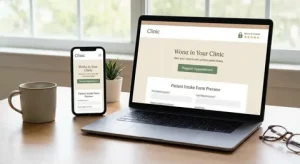
Many people search for healthcare services on their phones. If your website is not mobile-friendly, you may lose potential patients. Planning a responsive design ensures your website works smoothly on all devices.
Provide Clear and Helpful Information
Patients visit your website to get information about your services. Make sure your content is clear, simple, and helpful. Avoid using complex medical terms that may confuse users.
Explain your services, treatments, and processes in a way that anyone can understand. When patients feel informed, they are more likely to trust your services and book an appointment.
Build Trust with Patients
Trust is very important in healthcare. Your website should include elements that make patients feel confident about choosing you. This can include doctor profiles, certifications, and patient testimonials. Sharing real experiences and success stories helps build credibility.
Improve Website Speed
A slow website can frustrate users and cause them to leave. Speed is an important part of planning your website design. Make sure your pages load quickly so users don’t have to wait.
Optimize images, use simple design elements, and choose reliable hosting. A fast website keeps visitors engaged and improves their overall experience.
Use Clear Call-to-Actions
Call-to-actions (CTAs) guide users on what to do next. Whether it’s booking an appointment or contacting your clinic, CTAs should be clear and visible.
Use simple phrases like “Book Now” or “Schedule Appointment.” Place these buttons in important areas of your website. Clear CTAs make it easier for users to take action.
Add Easy Contact Options
Some patients prefer to call or ask questions before booking. Your website should provide easy contact options like phone number, email, and contact forms.
Make sure this information is easy to find. Adding features like live chat can also improve communication. When patients can reach you easily, they feel more confident about choosing your services.
Optimize for Search Engines
Your website should be easy to find on search engines. Using the right keywords, improving speed, and creating useful content can help improve your visibility.
When your website appears in search results, more people can discover your services. This increases traffic and leads to more appointment bookings.
Keep Updating Your Website
A healthcare website should always stay updated. Add new information, update services, and refresh content regularly. This shows that your clinic is active and reliable.
Regular updates also help improve your search rankings and keep users engaged. A fresh and updated website encourages visitors to return and book appointments.
Conclusion
Planning website design for healthcare requires a clear focus on patient needs and user experience. From simple design and fast speed to easy booking and clear information, every detail plays a role in driving more appointments. Investing in professional healthcare website design services can help ensure your website is built to meet patient expectations and perform effectively.
When your website is easy to use and builds trust, patients feel more comfortable choosing your services. By following these steps, you can create a healthcare website that not only looks professional but also delivers real results for your practice.