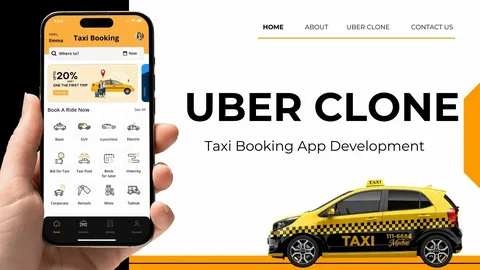
User experience is the foundation of any successful Uber clone app. In a highly competitive ride-hailing market, users do not stay loyal to platforms that feel confusing, slow, or unreliable. They choose apps that are simple to use, responsive, and designed around their real needs. Enhancing user experience is not just about design; it includes
User experience is the foundation of any successful Uber clone app. In a highly competitive ride-hailing market, users do not stay loyal to platforms that feel confusing, slow, or unreliable. They choose apps that are simple to use, responsive, and designed around their real needs. Enhancing user experience is not just about design; it includes performance, communication, safety, and consistency across every interaction. This guide explains how you can improve user experience in your Uber clone app using simple language and practical ideas that focus on long-term growth.
Understanding User Experience in an Uber Clone App
User experience refers to how riders and drivers feel while using your app. It includes how easy it is to book a ride, how clearly information is shown, how fast actions are completed, and how supported users feel when problems arise.
In an Uber clone app, there are two main user groups: riders and drivers. Each group has different expectations, but both want clarity, reliability, and fairness. Enhancing user experience means creating smooth journeys for both sides while keeping the platform stable and trustworthy.
Designing a Simple and Intuitive User Interface
A good user interface makes the app easy to understand without instructions.
Clean Layout and Visual Clarity
A clean layout helps users focus on what matters. Avoid cluttered screens, unnecessary text, and complex menus. Use clear labels, readable fonts, and consistent colors. When users can find what they need quickly, they feel more comfortable using the app.
Visual clarity also reduces mistakes. For example, clear buttons for booking, canceling, or contacting support help users take action confidently.
Easy Navigation Flow
Navigation should follow a logical flow. Riders should be able to book a ride, track it, and complete payment without switching between too many screens. Drivers should be able to accept rides, navigate routes, and check earnings easily.
Reducing the number of steps required to complete tasks improves speed and satisfaction.
Improving the Onboarding Experience
The onboarding experience sets the tone for future usage.
Smooth Rider Onboarding
Riders should be able to sign up quickly using simple options like mobile numbers or email. Asking for too much information upfront can cause drop-offs. Showing a short introduction that explains how the app works helps first-time users feel confident.
Clear Driver Onboarding Process
Drivers need guidance during registration. A step-by-step onboarding process with progress indicators makes registration less stressful. Clear instructions for document uploads and verification reduce confusion and delays.
Enhancing Ride Booking and Tracking Experience
Booking and tracking are the core features of an Uber clone app.
Fast and Accurate Ride Booking
The booking process should be fast and responsive. Pickup location detection, fare estimation, and ride confirmation should happen within seconds. Delays during booking frustrate users and lead to app abandonment.
Accurate fare estimates build trust and help users make informed decisions.
Real-Time Ride Tracking
Real-time tracking helps riders feel in control. Showing the driver’s location, estimated arrival time, and route updates reduces anxiety. Clear communication during the ride improves the overall experience.
For drivers, accurate tracking helps them plan routes and avoid delays.
Improving Communication Between Riders and Drivers
Clear communication prevents misunderstandings.
In-App Messaging and Calling
In-app messaging and calling features allow riders and drivers to communicate without sharing personal contact details. This protects privacy and keeps communication secure.
Clear notifications for messages and calls ensure important updates are not missed.
Automated Notifications and Updates
Automated notifications keep users informed about ride status, driver arrival, and payment confirmation. Timely updates reduce uncertainty and improve satisfaction.
Enhancing Safety and Trust Features
Safety plays a major role in user experience.
Rider Safety Tools
Features like emergency buttons, live ride sharing, and driver details improve rider confidence. When users feel safe, they are more likely to use the app regularly.
Clear safety instructions and visible safety options reassure users.
Driver Safety and Support
Drivers also need safety features. Options to report issues, block problematic users, and access support help drivers feel protected. A safe environment encourages drivers to stay active on the platform.
Optimizing App Performance and Reliability
A slow app damages user experience.
Fast Loading and Smooth Performance
Optimizing app performance ensures screens load quickly and actions respond instantly. Users expect smooth transitions and minimal waiting time.
Regular performance testing helps identify and fix issues before they affect users.
Stability Across Devices
Your Uber clone app should work well on different devices and network conditions. Optimizing for low-end devices and unstable networks ensures a wider audience can use your app comfortably.
Creating a Transparent and Fair Payment Experience
Payments are a sensitive part of the user journey.
Clear Fare Breakdown
Showing a clear fare breakdown before and after the ride helps users understand charges. Transparency builds trust and reduces disputes.
Simple and Secure Payment Flow
Payment steps should be simple and secure. Supporting multiple payment options gives users flexibility and improves satisfaction.
Supporting Drivers with Better Tools
Drivers are key to a positive rider experience.
Driver-Friendly App Design
A simple and stable driver app reduces stress. Clear navigation, easy ride acceptance, and visible earnings information help drivers focus on driving.
Fair Ratings and Feedback System
A fair rating system encourages respectful behavior from both riders and drivers. Providing clear feedback guidelines helps maintain balance and trust.
Using Feedback to Continuously Improve User Experience
User experience evolves over time.
Collecting User Feedback
In-app feedback options allow users to share experiences easily. Listening to feedback helps you identify pain points and improvement areas.
Acting on Feedback
Making visible improvements based on feedback shows users that their opinions matter. This builds loyalty and long-term engagement.
Localizing the Experience for Different Markets
Local relevance improves comfort and usability.
Language and Cultural Adaptation
Supporting local languages and familiar terms helps users feel at home. Cultural adaptation improves understanding and reduces friction.
Region-Specific Features
Customizing features such as payment methods or ride options based on local preferences improves adoption and satisfaction.
Conclusion
Enhancing user experience in your Uber clone app is a continuous effort that touches every part of the platform. From simple design and smooth onboarding to reliable performance, clear communication, and strong safety features, each element shapes how users feel about your service. A positive experience encourages repeat usage, loyalty, and word-of-mouth growth. Working with an experienced on demand app development company can help you design, refine, and scale user-focused features that meet real needs and keep your platform competitive in the long run.
FAQs
Why is user experience important in an Uber clone app?
User experience determines how comfortable and satisfied users feel, directly affecting retention and long-term growth.
How can I improve first-time user experience?
You can improve first-time experience by simplifying onboarding, offering clear guidance, and ensuring fast app performance.
What features improve rider satisfaction the most?
Fast booking, real-time tracking, transparent pricing, and strong safety features greatly improve rider satisfaction.
How does driver experience affect user experience?
Happy drivers provide better service, which improves rider satisfaction and overall platform reputation.
How often should user experience improvements be made?
User experience should be reviewed regularly through feedback and performance data to keep the app aligned with user expectations.